If you were to peek inside Postgres and see how the tables are stored, you’d be surprised they look nothing like the outuput you get when you do a SELECT query.
In this post I look inside Postgres to understand how tables are stored in the filesystem. The goal of this post is nothing more than to understand a small part of the whole Postgres ecosystem to demystify things a bit. It is a step by step process to find out where tables actually live in the filesystem and their structure.
Let’s begin.
Installation
Install Postgres in your machine using brew, and start the service
brew install postgresql@17
brew services start postgresql@17
Use psql to connect to the Postgres database.
psql postgres
As a refresher, remember that within a Postgres cluster, we can have different databases. postgres is the default database, but we could easily create many other databases.
Let’s create our own database. From within the psql console run
psql> CREATE DATABASE mydb;
And then exit the postgres database using the \q command. Then connect to the newly created database using
psql mydb
From this point on, any shell command prefixed by psql> is ran inside the psql console connected to mydb.
Add Data
The final step in this setup is to create a dummy table. I run the following queries within the psql console.
psql> CREATE TABLE films (
    code        char(5) CONSTRAINT firstkey PRIMARY KEY,
    title       varchar(40) NOT NULL,
    did         integer NOT NULL,
    date_prod   date,
    kind        varchar(10),
    len         interval hour to minute
);
and add some data to the table
psql> INSERT INTO films (code, title, did, date_prod, kind, len) VALUES
('B6717', 'The Shawshank Redemption', 101, '1994-09-23', 'Drama', '02:22'),
('C8874', 'Inception',                102, '2010-07-16', 'Sci-Fi', '02:28'),
('A1234', 'The Godfather',            103, '1972-03-24', 'Crime', '02:55'),
('D4521', 'Interstellar',             104, '2014-11-07', 'Sci-Fi', '02:49'),
('E7789', 'Parasite',                  105, '2019-05-30', 'Thriller', '02:12');
Now we have a films table inside the public schema in the mydb database.
Finding the Location of the Table in the Filesystem
A Postgres database is basically a single directory containing all its data inside it. In this section I’ll find where the films table is stored within our filesystem.
We can find the base directory where the Postgres cluster lives in our machine by running this command:
psql> show data_directory;

/opt/homebrew/var/postgresql@17
We can verify this path actually exists by running ls on our machine
ls -lh /opt/homebrew/var/postgresql@17
total 120
drwx------@  6 pablolopez  admin   192B Aug 19 20:19 base
drwx------@ 65 pablolopez  admin   2.0K Aug 19 20:20 global
drwx------@  2 pablolopez  admin    64B Aug 11 19:39 pg_commit_ts
drwx------@  2 pablolopez  admin    64B Aug 11 19:39 pg_dynshmem
...
Here you get a bunch of directories. They all do different things in Postgres, but that’s outside the scope of this blog. In this case we will focus on the base directory which is the one containing the database directories.
When we look into the base directory we get a list of folders representing the different Postgres databases.
ls -lh /opt/homebrew/var/postgresql@17/base
total 0
drwx------@ 301 pablolopez  admin   9.4K Aug 19 20:03 1
drwx------@ 303 pablolopez  admin   9.5K Aug 19 20:20 16438
drwx------@ 300 pablolopez  admin   9.4K Aug 11 19:39 4
drwx------@ 304 pablolopez  admin   9.5K Aug 19 20:02 5
Each of these numbers is the object id (OID) referencing a database. We can find out which OID belongs to which database by running this SQL inside the psql console
psql> SELECT oid, datname
FROM pg_database;

  oid  |  datname
-------+-----------
     5 | postgres
 16438 | mydb
     1 | template1
     4 | template0
(4 rows)
As we can see mydb folder is OID number 16438. Let’s run ls on this directory to see the contents:
ls -lh /opt/homebrew/var/postgresql@17/base/16438/

total 15560
-rw-------@ 1 pablolopez  admin   8.0K Aug 19 20:22 112
-rw-------@ 1 pablolopez  admin   8.0K Aug 19 20:22 113
-rw-------@ 1 pablolopez  admin   120K Aug 19 20:22 1247
-rw-------@ 1 pablolopez  admin    24K Aug 19 20:22 1247_fsm
-rw-------@ 1 pablolopez  admin   8.0K Aug 19 20:22 1247_vm
-rw-------@ 1 pablolopez  admin   440K Aug 19 20:22 1249
...
There are a bunch of objects in here. Each of these can represent a table, indexes or other objects within Postgres.
We are interested in finding the location of the films table, which we can find using this query:
psql> SELECT pg_relation_filepath('films');

 pg_relation_filepath
----------------------
 base/16438/16439
(1 row)
In this case 16439 refers to the table’s relfilenode and not the Object ID. If we run this query, we can check that relfilenode and oid are two different things:
psql> SELECT relname, oid, relfilenode FROM pg_class WHERE relname = 'films';

relname |  oid  | relfilenode
---------+-------+-------------
 films   | 16439 |       16439
In this case, the OID and the relfilenode are exactly the same. However this may not always be the case.
Once more, we can verify this table exists in our machine by checking the path
ls -lh /opt/homebrew/var/postgresql@17/base/16438/16439

-rw-------@ 1 pablolopez  admin   8.0K Aug 19 20:24 /opt/homebrew/var/postgresql@17/base/16438/16439
Now that we know where the physical Postgres table actually lives, let’s see how data is stored within it.
Looking Inside the Table Files
When we query the table using SQL, it looks like this:
psql> select * from films;
 code  |          title           | did | date_prod  |   kind   |   len
-------+--------------------------+-----+------------+----------+----------
 B6717 | The Shawshank Redemption | 101 | 1994-09-23 | Drama    | 02:22:00
 C8874 | Inception                | 102 | 2010-07-16 | Sci-Fi   | 02:28:00
 A1234 | The Godfather            | 103 | 1972-03-24 | Crime    | 02:55:00
 D4521 | Interstellar             | 104 | 2014-11-07 | Sci-Fi   | 02:49:00
 E7789 | Parasite                 | 105 | 2019-05-30 | Thriller | 02:12:00
(5 rows)
In reality, Postgres structures the table files into pages. Pages have fixed length which is 8192 bytes (8 KB) by default. The internal layout of pages depends on the data file type (table, indexes, etc).
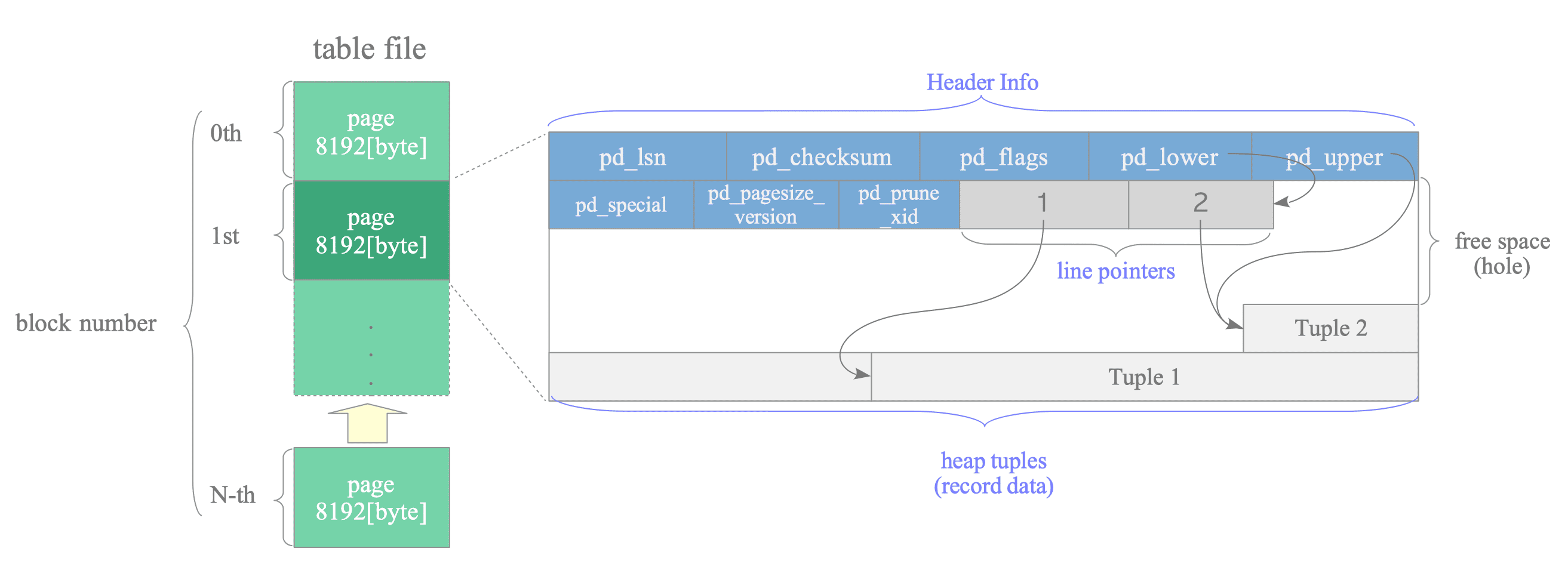
(Image Source: Internals of Postgres by Hironobu SUZUKI )
A page contains 3 sections:
- the page header which contains general information about the page;
- the line pointers which point to the location of each tuple in the page;
- and the tuples, where each tuple represents a row of data.
We can try to verify this table structure by peeking inside the actual table file.
cat /opt/homebrew/var/postgresql@17/base/16438/16439

C8874InceptionfhSci-Fi�id\�
Drama���%
We get some gibberish output because the file is in binary format.
Since the data file is encoded in binary format, I’ll use some helper SQL commands to visualise the different components of the table. I’ll need to install the pageinspect extension within the database.
psql> CREATE EXTENSION pageinspect;
Page Headers
To view the page headers we can run the following command. The 0 parameter represents the page number.
psql> SELECT * FROM page_header(get_raw_page('films', 0));

    lsn    | checksum | flags | lower | upper | special | pagesize | version | prune_xid
-----------+----------+-------+-------+-------+---------+----------+---------+-----------
 0/1A24320 |        0 |     0 |    44 |  7792 |    8192 |     8192 |       4 |         0
(1 row)
These are the header definitions:
- lsn: last change recorded for this page
- checksum: page integrity check value
- flags: status bits about the page (e.g. visibility/fullness of the page)
- lower/upper: start/end of free space within the page
- special: reserved space (mainly used by indexes)
- pagesize: size of the page in bytes (usually 8192)
- version: page layout format version
- prune_xid: oldest transaction that may still need cleaning on this page
Data Tuples and Line Pointers
To view the actual tuples and the line pointers we can run these commands:
psql> SELECT *
FROM heap_page_items(get_raw_page('films', 0));

lp | lp_off | lp_flags | lp_len | t_xmin | t_xmax | t_field3 | t_ctid | t_infomask2 | t_infomask | t_hoff | t_bits | t_oid |                                                               t_data
----+--------+----------+--------+--------+--------+----------+--------+-------------+------------+--------+--------+-------+------------------------------------------------------------------------------------------------------------------------------------
  1 |   8104 |        1 |     88 |    750 |      0 |        0 | (0,1)  |           6 |       2306 |     24 |        |       | \x0d42363731373354686520536861777368616e6b20526564656d7074696f6e00650000007af8ffff0d4472616d61000000e2d4fb010000000000000000000000
  2 |   8032 |        1 |     72 |    750 |      0 |        0 | (0,2)  |           6 |       2306 |     24 |        |       | \x0d433838373415496e63657074696f6e66000000090f00000f5363692d466900000c4a11020000000000000000000000
  3 |   7952 |        1 |     80 |    750 |      0 |        0 | (0,3)  |           6 |       2306 |     24 |        |       | \x0d41313233341d54686520476f646661746865726700000060d8ffff0d4372696d650000000000000049d971020000000000000000000000
  4 |   7872 |        1 |     80 |    750 |      0 |        0 | (0,4)  |           6 |       2306 |     24 |        |       | \x0d44343532311b496e7465727374656c6c61720068000000301500000f5363692d46690000000000001f645c020000000000000000000000
  5 |   7792 |        1 |     80 |    750 |      0 |        0 | (0,5)  |           6 |       2306 |     24 |        |       | \x0d45373738391350617261736974650069000000b11b000013546872696c6c657200000000000000009c11d8010000000000000000000000
(5 rows)
The items prefixed with the letter l refers to line pointers:
- lp: the position of the tuple
- lp_off: line pointer offset in bytes where the data tuple begins
- lp_flags: 1 = normal tuple, others indicate dead, redirected, etc.
- lp_len: length in bytes of the tuple
The items prefixed with t refers to transaction information:
- t_xmin: transaction id that inserted this tuple
- t_xmax: transaction id that deleted this tuple (0 if still alive)
- t_ctid: physical location of this tuple as (block_number, offset_number).
- t_data: Raw tuple data bytes (hex-encoded)
Conclusion
Postgres tables look nothing like the neat rows and columns we see in a SELECT * query. In this blog post I’ve gone through the steps to find where tables are actually stored in the filesystem and what they actually look like. My goal was to demystify a small part of Postgres to prove to myself that databases are not magic, but rather files stored in an instance, all done in a very clever way.